
Shop Online
NEW YEAR SALE-EZLYNK TUNERS & TUNE PKGS!
07.5-21 Ram 6.7l Hp levels & 14-18 3.0L Eco Diesel!
Power Levels (Emissions Removed):
- + 30HP
- + 50HP
- + 100HP
- + 150HP
- + 180HP
Limited Support Package. Our limited support packs give you access to all tuning compatible with your vehicle for 4 weeks. This is convenient if you’re seeking a single tune to install on your vehicle. Once the 4 week expires the tune that is currently in your truck will remain. Upgrading to Full support will give you access to all tuning and software updates indefinitely.
Full Support Package offers unlimited flashes and basic tune revisions on ALL TUNES. You’ll receive automatic tune updates so that you can take advantage of the progress that we make and enjoy the timelessness of the EZ LYNK AutoAgent.
The SOTF Switch is needed to correctly run SOTF tunes. Without the switch installed, your tune will default to the lowest power level. Installing the switch will allow you to adjust power levels and maximize your vehicle’s performance instantly.
TCM Tuning will increase the line pressure in your transmission so it can keep up with all the added power your engine will be producing from the tunes. We highly recommend TCM tuning to anyone with a 68RFE that plans on running anything more than a tow tune. Please specify if you have any transmission modifications when ordering TCM Tuning!!
| Year | Tune 1 | Tune 2 | Tune 3 | Tune 4 | Tune 5 | Tune 6 |
| 2008-2010 6.4L |
+0HP | +60HP | +120HP | +180HP | +240HP | +300HP |
| 2011-2014 6.7L | +0HP | +30HP | +50HP | +100HP | +150HP | N/A |
| 2015-2019 6.7L | +0HP | +50HP | +100HP | +150HP | +200HP | N/A |
2016-2019 Nissan XD 5.0L Cummins Power Levels:
| Level 1 | Level 2 | Level 3 | Level 4 | Level 5 | |
| 0HP | 30HP | 60HP | 90HP | 120HP |
Tune Levels
2018-2020 3.0L Powerstroke
| Emissions | Level 1 | Level 2 | Level 3 | Level 4 | Level 5 |
| On | 0HP | 25HP | 60HP | 95HP | N/A |
| Off | 0HP |
25HP |
60HP |
95HP |
120HP |
Power Levels (Emissions Removed): 07.5-16 Chevy Duramax. 16-21 2.8L Duramax 3 Tunes Only.
- 0 HP
- + 50HP
- + 100HP
- + 150HP
- + 200HP
Installation Steps
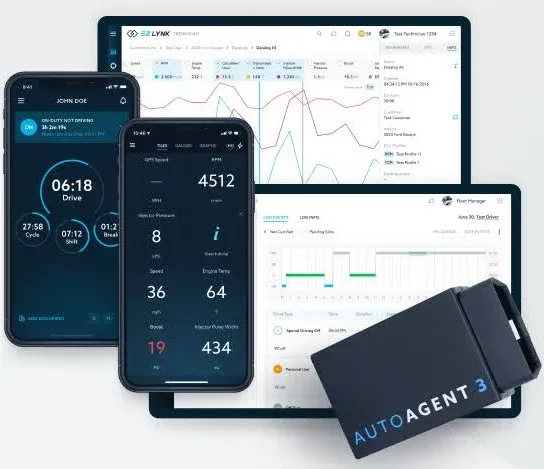
Living up to the brand name, EZ LYNK has made the installation process simple. We’ve broken down each step and provided some valuable information that will help you understand how your AutoAgent works.
- Step One: Download & Install the AutoAgent App
- The AutoAgent app is available for most smart devices. It requires iOS 8+ or Android 5+ to operate. You can download the iOs app here and the Android app here.
- Step Two: Create an Account
- From the AutoAgent app, select ‘create an account’. You will need to verify that your email address is valid upon creation. Dealers should always create an account for the end-user or use the account that the end-user has already created.
- Step Three: Place Your Key in the ‘Run’ Position
- Turn your key all the way over without starting the vehicle. This will boot your vehicle’s engine computer allowing the AutoAgent to communicate with it. If you have a push-to-start vehicle, you should press the Start button twice.
- Step Four: Plug the AutoAgent into your OBD-II Port
- With the key in the ‘Run’ position, plug your AutoAgent into your vehicle’s On-Board Diagnostics port. You can verify that it has booted correctly when you see that a blue and green light are illuminating from the device.
- Step Five: Connect to your AutoAgent from your Smart Device
- Navigate to the WiFi settings of your smart device and select the ‘EZLYNK_####’ network. A check mark will appear next to the network name when you have successfully connected. The AutoAgent 2 also allows you to connect via Bluetooth.
- Step Six: Open the AutoAgent App
- After you’ve successfully connected, you can navigate back to the AutoAgent app. You should now be able to see your vehicle gauges.
- Step Seven: Lynk your Vehicle
- When you purchase from Unlimited Performance or an authorized dealer, your vehicle will be AutoLynked. If your smart device has cellular data, you will notice that a message has appeared asking you to lynk the vehicle. Follow these prompts to connect your vehicle with your mechanic/technician. If your smart device does not have cellular data, you will need to connect to an internet available network and re-open the app to complete the lynking process.
- Step Eight: Program Your Vehicle
- After completing the lynking steps you are ready to flash your vehicle.
Navigate to > Vehicle > ECU Profiles. Here you can view the list of tunes or ECU profiles that are available to you.
Tap the button to download your desired ECU profile, followed by the ‘Install’ button to flash your vehicle. The app will guide you through the flashing procedure.
(When using a smart devices without cellular data you will need to switch to an internet available network to download the ECU profile, then back to the EZ LYNK network to install the ECU profile.) -
-
Ez Lynk (JEEP & RAM ECODIESEL 3.0L & COLORADO / CANYON 2.8L INSTRUCTIONS)
OVERVIEW
- Flash Truck BEFORE installing any other parts
- Hook up a Battery Charger and set it to lowest charge
- Plug Auto Agent into your OBDII port
- Connect to AutoAgent via Wifi
- Connect to your Technician
- Go to ECU Profiles & Flash Your Tuning following the instructions below. (MUST READ INSTRUCTIONS OR WILL NOT FLASH TRUCK!)
Step 1: Buy a Ez Lynk Auto Agent 3.- Most likely If you are receiving these instructions you either bought an Ez Lynk with 4 Week Support pack or Unlimited Support Pack or you bought just the support pack and you already have an Ez Lynk.
Step 2: Tune your truck before removing the hard parts.- Make sure that you tune your truck before you even think about removing any parts. This way, if you have any trouble tuning your truck, you’re not dead in the water with a broken truck until Monday morning when we open back up.
Step 3: Hook up a battery charger.- Before you start, grab your battery charger and hook it up to the truck, it doesn't matter if you have brand new high-end batteries and you just finished trickle charging them to 100%. If you don’t have a battery charger, get one and set it to a 10A charge. The new ECM’s are very sensitive to voltage and the flash can fail if the voltage drops too low.
Step 4: Download the EZ-Lynk App.- Go to the App Store or the Google Play Store and download the EZ-Lynk Auto Agent App. Once the app has been downloaded and installed you can go ahead and make an account.
Step 5: Plug the EZ-Lynk into your OBDII .- You’re ready to plug in the EZ-Lynk into your OBDII port under the dash. If you’re flashing a 18+ Cummins or 3.0L Jeep or Ram 1500 ecodiesel you will need to connect the Bypass Cable at the same time. It only needs to be plugged in while you flash your tunes, however, it doesn’t hurt to leave it plugged in. In that case, you can run it through the firewall of the truck.
Step 6: Connect to the Auto Agent.- Open your WIFI Settings and connect to the Auto Agent via Wifi on your phone or tablet. Once you are connected you can open up the app, and the Auto Agent should detect your VIN number and recognize the connection.
- Go ahead and accept this, it will now ask you for a little bit of information on your truck, once completed, your tuning files will be manually added to your device once you let me know everything is linked up. (Please be aware you can generally just get files monday-friday during normal business hours, we try to be available for linking on weekends but cannot guarantee this) You’ll start to get push notifications as each file comes through into your account.
Step 7: Flash Your Tuning.- Now that you’re connected, the app will default to the main dashboard. From there you can select the button on the top left of the screen which will drop down a menu. From there, you select your vehicle, your truck should show up as the vehicle and give you a list of further options. Select ECU Profiles from that screen, this is where your tune files are stored, you’ll see a list of files.Colorado/Canyon 2.8L, Ram & Jeep 3.0L Ecodiesel must use the file that says flash first/reset file.
Jeep exact name will be: 68270625AG_1_MUST_FLASH_FIRST.
Ram 1500 exact name will be: #0 - MUST FLASH FIRST THE VERY FIRST TIME.
Colorado/Canyon 2.8L it will have the year of your truck followed by: 2.8_RESETFILE.
Flash the correct above tune onto your truck, tune must be flashed first before anything else. Flashing this file should take about 7 minutes, if it flashes super fast then it is not actually flashing the truck. Next fully disconnect the Ezlynk and all power INCLUDING BATTERIES for 10 min. - Next select the tune file you want to use on your truck.
Ram 1500 will have a name such as: 68280881AJ_ECODIESEL_50HP_ECONOMY_07-15-24
Jeep ecodiesel will be named something like: 68270625AG_ECODIESEL_50HP_ECONOMY_7-18-24
2.8L Colorado or Canyon you will find the correct year of your truck and the file name will be something like: 2016_28_DAILY_090823 (The correct file name will start with the year of your truck)
There is a cloud button to the right of the file name, it will pull the tune from the cloud and save it to your phone.
Phone- You’ll need Cell Service to download the tune files to your device.
Tablet- You’ll need to disconnect Wifi from the Auto Agent and download these tune files via Wifi, then connect back to the EZ-Lynk Wifi after you’ve downloaded the tune.
- Once the file is downloaded, you can press install and the EZ-Lynk will guide you through a Key On, Key-Off Procedure and the truck will flash. Once the tune has flashed into the truck, it will now say Installed under the tune file.
- Once the truck is flashed you are good to go. You can use the chat feature to connect directly to your technician and ask any technical questions you may have. You'll also be able to send your Data Logs to your technician if you're having any issues and they will be able to diagnose and possibly solve the problem without you bringing the truck into a shop.
- If you don't plan on monitoring your parameters on your phone, you can unplug the EZ-Lynk. You only need it plugged in when you're using the App to monitor, flash, or diagnose.
- The main dashboard is where you can view the parameters, the tiles can be adjusted and moved to your preference by holding your finger down on any tile and choosing from a list.
4 Week or Lifetime Support Pack Only- If you already own an EZ-Lynk Auto Agent and just purchased a support package, you can add a technician to any account by clicking the top left button in the app and selecting 'Technicians'. There is a plus sign under this selection and you can manually type in any technician account.
- If the tuner has selected to auto-populate the files, as soon as it's linked, the Auto Agent will detect what truck you have and push you all the tune files for your truck.
- Now that you're all flashed up, you can go ahead and shut down the truck and install your Other Parts. If you have any questions at all, don't hesitate to reach out and message us via the ez lynk app.